


Your WordPress site went down, and no one could reach your contact form or your booking page. A plugin update you installed two weeks ago triggered the conflict, bringing your business to a halt. If this sounds familiar, you’ve already felt the disruption. If not, urgency is rising; you’re overdue.
The real issue is not just choosing DIY or managed WordPress maintenance. It’s about which one actually minimizes your total cost, what’s taken, what revenue is lost, and what happens when failures strike unexpectedly. Let’s look at both options honestly. The answer varies by business, but most owners get it wrong. This scenario unfolds on 13,000 WordPress sites daily. Owners are not careless; the danger is invisible. Managing your own site costs more than $30 for a security plugin; it’s the silent risk ticking away whenever background tasks go unchecked.
Table of Contents
1. Comparing DIY WordPress Care With Fully Managed Support
2. What ‘WordPress Maintenance’ Actually Involves
3. The Real Cost of DIY WordPress Maintenance
3:1 What You Pay for Tools
3:2What Doesn’t Show Up Anywhere
4. Why DIY Maintenance Keeps Failing Business Owners
4:1 The Update Problem Nobody Talks About
4:2 You’re Reacting to Problems That Already Happened
5. No Safety Net When Things Go Sideways
6. The Hidden Risks of Skipping or Inconsistent Maintenance
6:1 Security Is Usually Lost Through Plugins
6:2 Lost Rankings, Lost Leads, Lost Revenue
6:3 The Backup That Isn’t There When You Need
7. What a Professional Care Plan Actually Does Differently
7:1 Updates Run Through a Staging Environment First
7:2 Safe Offsite Backups
7:3 Monitoring That Catches Problems Before Visitors Do
7:4 Expert Support That Knows Your Site
8. Side-by-Side: DIY vs. Managed Care Plan
9. When DIY Actually Makes Sense
10. How WPAegis Does Maintenance Differently
11. FAQs
What ‘WordPress Maintenance’ Actually Involves:
Most owners think they’re maintaining WordPress by clicking Update All once a month. It’s just checking the fuel gauge and calling it full service. Real maintenance keeps a business website reliably online and secure. It covers a chain of interconnected tasks:
- Updates are checked first, not blindly pushed live.
- Backups stay off the main server for safety.
- Restore tests to confirm backups actually work when needed.
- Login activity and file changes are constantly watched.
- Malware scans help catch problems before they spread.
- Downtime alerts come before customer complaints.
- Old database clutter gets cleared out regularly.
- Extra revisions and junk data don’t pile up.
- Speed drops are tracked before they hurt traffic.
- A staging environment to test changes before they reach your live site.
Each of those has a time cost, a technical learning curve, and a failure mode. Miss one consistently and you’re not doing maintenance; you’re running a delayed emergency waiting for a trigger. WPAegis watches your WordPress site every day so you never find out the hard way.
The Real Cost of DIY WordPress Maintenance:
What You Pay for Tools:
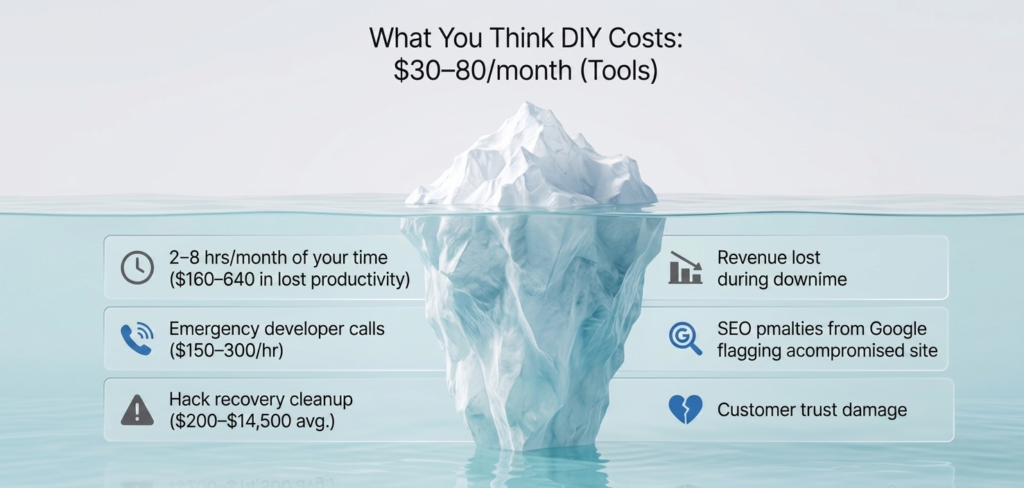
When business owners estimate DIY costs, they usually list their hosting plan, a security plugin, and sometimes a backup service. This calculation typically ranges between $15 and $60 per month and appears reasonable on paper.
Here’s a realistic breakdown of what those tool subscriptions actually cover:
- Basic or managed WordPress hosting: $10–$80/month
- Security plugin with active monitoring (Wordfence Premium, Sucuri, etc.): $10–$50/month
- Backup plugin with offsite storage (BlogVault, UpdraftPro): $5–$25/month
- Performance or caching tool: $5–$30/month
Tool costs may seem manageable at $30–$185 per month, but that number misses the real financial risk: tools alone don’t prevent costly downtime or loss.
What Doesn’t Show Up Anywhere:
The hidden cost of DIY maintenance is your time, and most business owners have little to spare. Not tracking this cost distorts the real savings. Proper maintenance isn’t just clicking buttons.
Testing updates, reviewing logs, checking backups, and monitoring performance can take 2 to 8 hours monthly. For a complex site, this takes more than a full workday, even without unexpected problems.
Why DIY Maintenance Keeps Failing Business Owners:
The Update Problem Nobody Talks About
Most WordPress site crashes aren’t caused by server downtime or a complex attack. They’re caused by plugin updates, which is exactly the task that DIY maintenance centers on. It’s not updating, it’s updating blind. Pushing 12 plugin updates live without staging breaks checkout, booking, and galleries. Even if the site looks fine, silent failures can cost you dearly. Bulk updates are the most preventable source of downtime.
You’re Reacting to Problems That Already Happened:
DIY maintenance is mainly reactive; updates and checks happen only when you notice issues. By then, hidden website problems have often already cost you money and reputation. These problems build up quietly and quickly without announcing themselves.
No Safety Net When Things Go Sideways:
If your site breaks at the worst time, you have three DIY options: fix it yourself under pressure, post on forums and hope, or pay for an emergency developer at their rate. Emergency developer support, when needed, costs $300–$600 for a few hours. This expense is in addition to your regular DIY costs and can escalate if backups are outdated or if restoration isn’t straightforward.
The Hidden Risks of Skipping or Inconsistent Maintenance:
When maintenance is skipped even partially or temporarily, the consequences don’t stay hidden for long. Security is usually lost through plugins. Most WordPress break-ins don’t happen because of WordPress itself. The weak spot is usually plugins, because a typical business site runs dozens of them, and each extra plugin adds another potential entry point. Many security flaws become public before a fix is even available.
At that point, updating alone won’t do anything. The more extensions a site depends on, the harder it becomes to manage security properly. You need systems in place that can detect suspicious activity, block known attack patterns, and reduce exposure while developers work on an update.
Lost Rankings, Lost Leads, Lost Revenue:
A WordPress site that isn’t maintained slows down due to a bloated database, redundant plugins, and broken caching. A drop from 1.8 to 4.2 seconds means lower rankings, fewer conversions, and more bounces, revenue lost with no invoice.
For a business that relies on search traffic, slower load speeds lead to lower rankings, fewer conversions, and more bounces. The revenue impact appears as fewer calls, without an invoice.
The Backup That Isn’t There When You Need It:
Most DIY setups include a backup plugin. Many plugins are configured correctly, but fewer produce backups that restore cleanly, and even fewer have been tested. Backup file corruption, incomplete snapshots, and missing database tables aren’t rare edge cases.
They’re common enough that ‘Does your backup actually restore?’ is one of the first questions a professional asks when taking over a site that’s had problems. Not sure if your site needs professional maintenance? Request your free audit, see exactly where your site stands, no sales call, no pressure, just honest answers to what’s working and what isn’t. Take control today.
What a Professional Care Plan Actually Does Differently:
The difference between a professional care plan and doing it yourself isn’t just who clicks the update button. It’s the entire system that surrounds that action, and the expertise brought to every decision in that chain.
1. Updates Run Through a Staging Environment First:
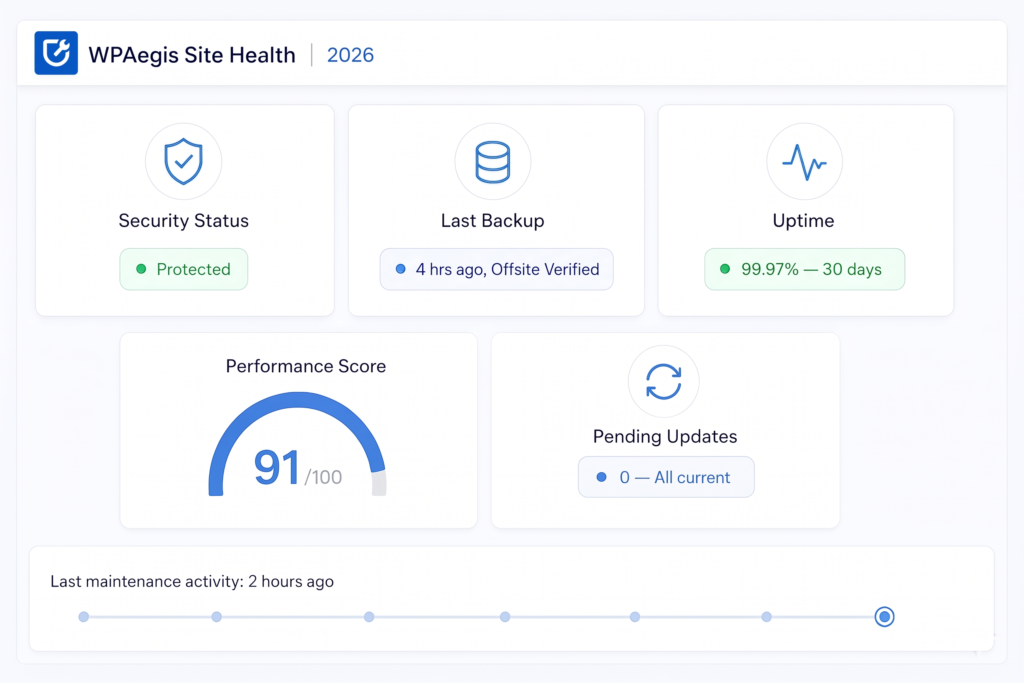
Every update, plugin, theme, or core gets applied to a copy of your site before it goes anywhere near your live pages. After the update, critical functions are manually verified: contact forms, checkout flows, booking systems, and login areas. Only after confirmation does the change move to production.
2. Safe Offsite Backups:
Daily automated backups are standard for professional care. The added value is verified restoreability, reducing downtime and potential recovery costs compared to the uncertainty of DIY backup reliability. Backups are also stored offsite. If something happens at the server level, the backup isn’t on the same server that just failed.
3. Monitoring That Catches Problems Before Visitors Do:
Uptime monitoring checks your site continuously for file changes, unauthorized logins, and outbound connections, and also tracks Core Web Vitals over time, not just once during a setup call. When something flags, someone who knows what they’re looking at responds, not after business hours tomorrow, but quickly, because that’s the job.
4. Expert Support That Knows Your Site:
When you have an odd error, a plugin conflict, or a page that’s suddenly formatting wrong, you don’t start from scratch, explaining your site setup to a stranger on a forum. Your care plan provider already knows your stack, your hosting environment, and your active plugins. That context cuts resolution time dramatically.
Proactive guidance is also part of a good care plan, knowing when a plugin has a history of breaking during major WordPress core updates, flagging a plugin that hasn’t been maintained in a year before it becomes a security problem.
Side-by-Side: DIY vs. Managed Care Plan:
| Factor | DIY Maintenance | WPAegis Care Plan |
| Monthly tool spend | $30–$185 | Flat, predictable rate |
| Your time per month | 2–8+ hours | Zero — fully handled |
| Update process | Live site, no staging | Staged, tested, verified |
| Backup frequency | Varies (often inconsistent) | Daily + offsite storage |
| Restore tested? | Rarely | Yes, on a schedule |
| Security monitoring | Plugin-based, reactive | Active, 24/7 monitoring |
| Uptime alerts | None or delayed | Immediate notification |
| Vulnerability patching | When you remember | Proactively managed |
| Emergency support | Pay per incident | Included in the plan |
| Hack recovery cost | $200–$14,500+ per event | Covered and prevented |
| Performance tracking | Occasional checks | Monthly optimization |
| Peace of mind | Low — you carry the risk | High — we carry it |
When DIY Actually Makes Sense:
DIY works when:
- Your site is a personal blog, portfolio, or hobby project with no business or critical revenue attached to it.
- You have genuine technical familiarity with WordPress, not just admin panel comfort, but the ability to troubleshoot a fatal error, navigate via FTP, and restore from a backup under pressure.
- You can block 2–4 hours monthly, consistently, without letting maintenance drift when things get busy at work.
- A multi-day outage wouldn’t cost your business in missed inquiries, lost sales, or damaged client relationships.
If all four of those are true, a well-maintained DIY setup with solid hosting and reliable plugins is defensible.
How WPAegis Does Maintenance Differently:
WPAegis is built around a specific philosophy: a problem caught before it reaches your live site costs nothing. A problem that catches up after time, money, and sometimes clients.
A WPAegis care plan doesn’t make you guess; it always brings:
- Staged update testing before anything touches your live site.
- Daily automated backups are stored offsite with monthly restore verification.
- 24/7 uptime monitoring with immediate incident response.
- Malware scanning and proactive security hardening.
- Monthly performance optimization and Core Web Vitals review.
- Priority expert support with real response times, not ticket queues.
- Monthly maintenance reports so you always know what happened to your site.
FAQs:
A: ‘Not hacked yet’ isn’t the same as ‘protected.’ WordPress sites are scanned and probed automatically by bots, not because anyone targeted you specifically, but because you’re running software that 43% of the web runs, which makes it a high-value target for automated tools. The sites that stay clean aren’t the ones that got lucky; they’re the ones with active monitoring, current patches, and someone who checks for threats before they materialize into incidents.
A: Auto updates handle only part of one task; they don’t cover backups, security monitoring, performance, uptime alerts, or any of the other components that make up complete maintenance. They apply updates but don’t test them, don’t verify that your site still works correctly afterward, and don’t catch cases where an update creates a conflict that breaks your checkout page or quietly disables your contact form.
Q3: How badly can downtime or a hacked site affect search rankings?
A: If Google’s crawler detects malware, phishing redirects, or injected spam links, it can serve a ‘This site may harm your computer’ warning directly in search results, which drops click-through rates to near zero immediately. For sites that rank on competitive terms, losing those positions for even 30 days can represent months of recovery work. Spam link injections also harm domain authority. Downtime during peak hours hurts crawl budget and signals instability to ranking algorithms.
A: The WordPress threat landscape in 2026 is different because eleven thousand new vulnerabilities were recorded in a single year. Automated exploit tools running within hours of a patch disclosure. AI-driven bots are scanning for specific plugin versions across millions of sites simultaneously.

Leave a Reply