


If you run a WordPress site, you probably know that WordPress launches many releases and versions for the betterment of users. But as an agency, we hear people complaining that every few months WordPress releases a new version, a hype of posts about “exciting new features,” and then… nothing changes about how you actually manage your site in your daily routine.
Table of Contents:
- WordPress 7.1 RC1 Is Here: What Site Owners Should Actually Know
- What “Release Candidate 1” Actually Means
- When Is the Real Release?
- So What’s Actually New in 7.1?
- Responsive Styling, Built Into the Editor
- Interactive States, Without a Plugin
- Notes Grow Up
- Media Handling Gets Smarter
- New Blocks and a Toolbar That Actually Stays Put
- What Got Left Behind
- Should You Do Anything Right Now?
- The Bigger Picture
But WordPress 7.1 RC1 is a little different because it focuses on actual changes people really wanted, reaching Release Candidate stage on August 5, 2026. Now the 7.1 release covers many important areas like real responsive design controls, a proper Notes system for teams, and an editor that finally stops jumping around when you scroll. Here’s what’s actually happening, what it means for your site, and what you should (and shouldn’t) do about it right now.
What “Release Candidate 1” Actually Means
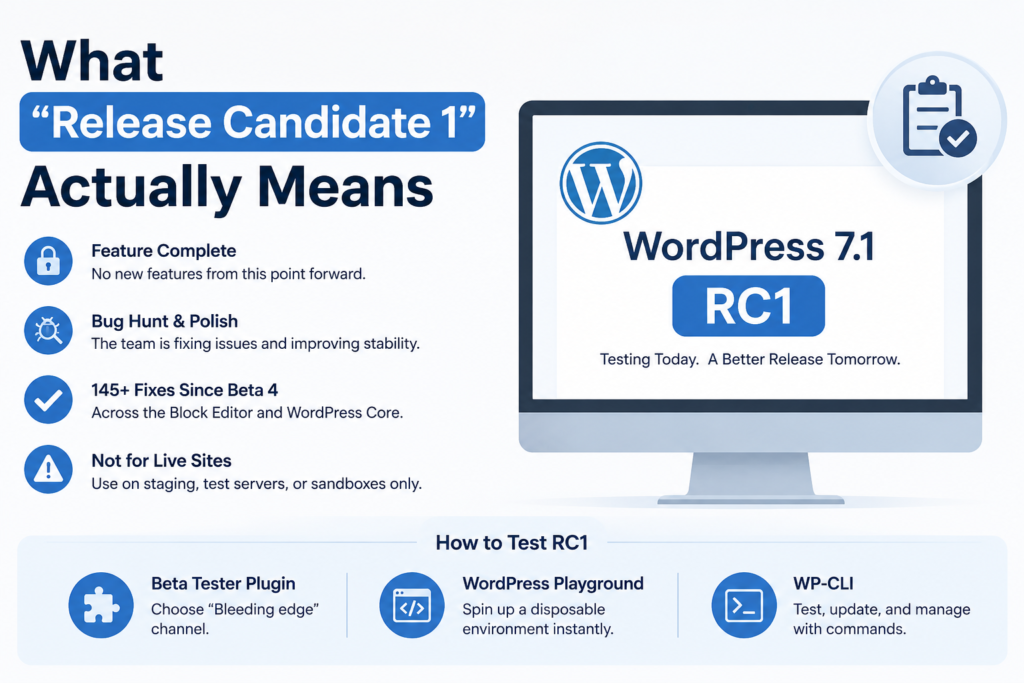
Before diving into features, let’s break down the terminology and make it easy to understand what RC1 actually is, because the terminology trips up a lot of people. WordPress releases go through a few designed stages before proper launch: Alpha, then several Betas, then Release Candidates, and finally the stable release. By the time software hits RC1, we lock the feature list after so much consideration. We will add no new functionality from this point forward; we purely hunt for bugs, polish what’s already there, and try to resolve issues. WordPress 7.1 went through four betas between mid-July and late July before reaching RC1 on August 5, and it’s now carrying more than 145 fixes and refinements made since Beta 4 alone, split roughly between the block editor and WordPress Core.
RC1 is not the finished product because WordPress is direct about this: don’t install it on a live, production website. WordPress 7.1 RC1 is for staging environments because the WordPress team is trying to solve issues that clients address after using the testing phase. If you want to poke around, you can grab it through the WordPress Beta Tester plugin (choose the “Bleeding edge” channel), spin up a disposable instance through WordPress Playground without installing anything locally, or run it through WP-CLI. None of that is necessary for the average site owner, but if you maintain plugins or a heavily customized theme, this is genuinely the window where testing pays off.
When Is the Real Release?
Mark it down: the team schedules WordPress 7.1 to go live on August 19, 2026, and times it to land alongside WordCamp US in Phoenix, which adds a nice touch and also gives the release squad a not-so-subtle deadline. Between now and then, there’s one more milestone, RC2, expected around August 12, followed by a final dry run on August 18 before the official release the next day.
So What’s Actually New in 7.1?
WordPress 7.0 was mostly about rebuilding the admin area and laying groundwork for AI-assisted workflows. With version 7.1, WordPress shifts focus to the editor itself and finally delivers a headline feature that users have requested for years: the ability to design how a block looks on different screen sizes without touching a single line of CSS.
Responsive Styling, Built Into the Editor
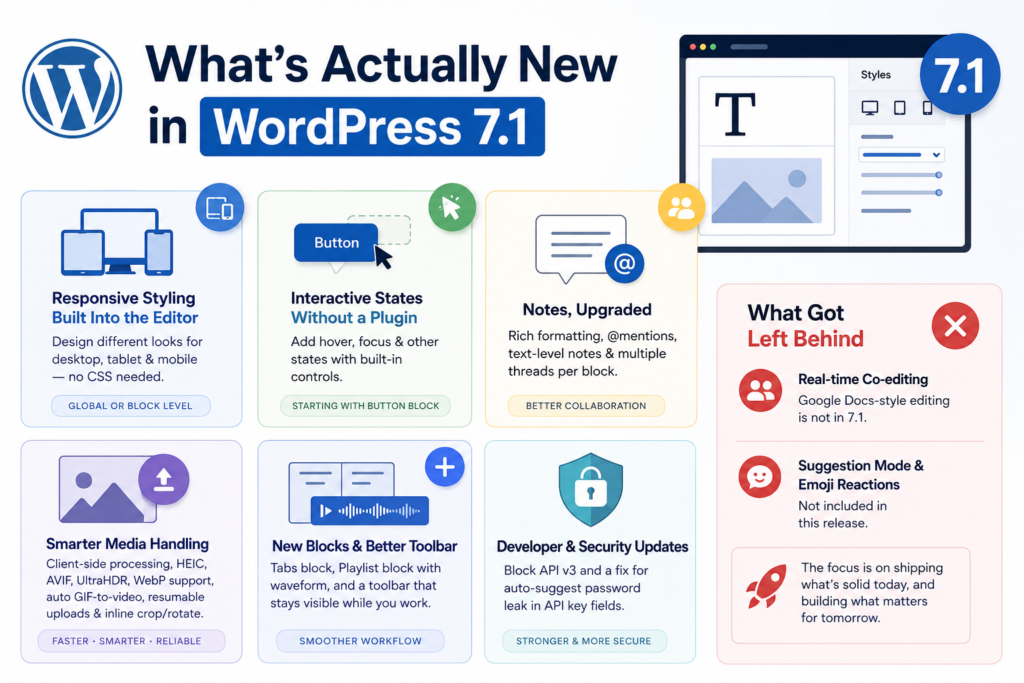
Up until now, if you wanted a heading to look smaller on mobile or wanted different spacing on tablets, you either needed a page builder plugin or a developer to write custom media queries. WordPress 7.1 puts that control directly in the block inspector. Switch your editor preview to Tablet or Mobile, adjust the styling, and WordPress applies those changes only at that screen size with a small badge letting you know exactly which breakpoint you’re editing.If you set something in Global Styles, it applies across your entire site.
And if you set it on a single block, it only affects that particular instance. Theme developers also get more control here, since theme.json now supports custom breakpoint definitions instead of everyone being locked into the same fixed values. For anyone who’s paid extra for a “premium” theme or plugin purely to get mobile-specific styling, this closes a real gap.
Interactive States, Without a Plugin
Alongside responsive styling, WordPress 7.1 introduces controls for interactive states, like a button that changes color when someone hovers over it or tabs into it with a keyboard. Now developers manage them through a standardized set of controls available for both Global Styles and individual blocks. At RC1, you’ll find this works most reliably on the Button block, and we expect broader block support to grow over time.
Notes Grow Up
In this WordPress release notes, the targeted improvements have been made to make clients’ work easier. If you’ve used WordPress’s Notes feature before, you’ll notice a real upgrade here. Notes now support rich formatting like bold, italics, code, and links, each with keyboard shortcuts, plus @mentions that pull up a searchable list of your collaborators. You can attach a note to a specific piece of text instead of an entire block, and you can run more than one conversation thread on the same block at once. Long notes now collapse by default, with a simple toggle to expand them, so your margins don’t turn into a wall of text while you’re trying to write.
Media Handling Gets Smarter
Media processing has moved client-side, meaning your browser now handles more of the heavy lifting when you upload images. That translates to broader format support, HEIC (the default format iPhones shoot in), AVIF, UltraHDR, and WebP, along with automatic GIF-to-video conversion for smaller file sizes.
WordPress 7.1 release works on uploads and tries to make this process easy for users; if your connection drops mid-upload, WordPress pauses and picks back up automatically once you’re back online, with a visible progress indicator the whole time. There’s also a new inline cropping and rotation tool, so basic image edits no longer require jumping out to a separate app.
New Blocks and a Toolbar That Actually Stays Put
New blocks are introduced in this WordPress 7.1 RC1, tab block and a playlist block. Tabs block is for organizing content into clickable sections, and a Playlist block that bundles audio files into a single player with an optional waveform display, handy for anyone running a podcast or music-related site without reaching for a plugin.
WordPress 7.1 also provides a visible admin toolbar as you scroll through the Block Editor and Site Editor, rather than disappearing the moment you start working. It sounds minor until you’ve lost it fifty times in a single editing session. On the developer side, the WordPress team upgrades the Block API from v2 to v3, and they quietly patch an important security flaw: they’ve closed a loophole that allowed browsers to auto-suggest saved passwords into API key fields on the Connectors screen.
What Got Left Behind
Not everything on the original roadmap made it into 7.1, and it’s worth being upfront about that. Real-time, Google Docs-style co-editing, the feature a lot of people were genuinely hoping for, is not part of this release. The team pulled it from WordPress 7.0 before that release too, and they’ve been candid that they still have open questions about how deep the feature should go and which storage approach to use. Suggestion mode and emoji reactions for Notes also didn’t make the cut this time around.
None of that means the work has stopped. It means the WordPress team would rather ship something solid later than ship something half-built now, which, if you’ve ever dealt with a buggy plugin update taking down a client site, is probably the right call.
Should You Do Anything Right Now?
The safe move is to wait for the stable release on August 19 and update through your normal process, or better yet, let whoever manages your site’s updates handle it, test it on staging first, and confirm nothing breaks before it touches your live pages.
The Bigger Picture
Why prefer and install WordPress 7.1 isn’t because of one single feature; instead, it’s responsive styling and interactive states used to justify paying for a premium page builder. Now they’re built into Core, for free, for everyone. That’s a meaningful shift for smaller businesses and solo site owners who’ve been priced out of “proper” design control until now. At the same time, every new release brings new dependencies, new edge cases, and new ways for an outdated plugin or a forgotten theme customization to break something you didn’t even know was fragile. That’s the trade-off that comes with WordPress moving forward, and it’s exactly the kind of thing a maintenance plan exists to catch before it becomes your problem.
If you’d rather not be the one testing RC builds, tracking release dates, or discovering a broken custom block the hard way, that’s what our WordPress care plans are for. We handle the updates, the testing, and the fixes, so your site stays current without you having to think about it.

Leave a Reply